
Authentication & Wallet
WebAuthn passkeys, PRF-derived secrets, and session keys.
Apertrue uses WebAuthn passkeys as the sole authentication mechanism. There are no passwords, no seed phrases, and no browser extensions. A passkey stored in the device's secure enclave serves as both the login credential and the signing key for Aztec transactions.
This section explains how passkeys are registered, how they derive cryptographic secrets, how they connect to the Aztec account contract, and how session keys eliminate repeated biometric prompts during uploads.
Passkey registration
Registration creates a WebAuthn credential using the browser's navigator.credentials.create() API, with credential ceremonies managed by the SimpleWebAuthn library. The credential is a P-256 ECDSA keypair generated inside the device's secure enclave (Secure Enclave on Apple, StrongBox on Android, TPM on desktop).
- Challenge. The browser generates 32 random bytes as the registration challenge. No server round-trip is needed — the challenge is verified locally.
- Credential creation. The browser calls
navigator.credentials.create()with: algorithm ES256 (ECDSA P-256), resident key required (discoverable credential), user verification required (biometric or PIN), and the PRF extension for secret derivation. - Biometric prompt. The user authenticates with Face ID, fingerprint, or device PIN. The secure enclave generates the keypair and returns the attestation response.
- Public key extraction. The attestation response contains an SPKI-encoded public key. The browser imports it via WebCrypto, exports it as a raw 65-byte uncompressed point (
0x04 || x || y), and extracts the 32-byte X and Y coordinates separately. - Storage. The credential ID (base64url) and public key coordinates (hex) are stored in IndexedDB. The private key never leaves the secure enclave — it exists only inside the authenticator hardware.
PRF — deriving secrets from passkeys
The PRF (Pseudo-Random Function) extension to WebAuthn allows the authenticator to output deterministic key material based on an input salt. Same passkey + same salt = identical output, every time, on every synced device. Apertrue uses PRF to derive all cryptographic secrets.
What PRF derives
| Secret | Derivation | Purpose |
|---|---|---|
| Aztec secret key | PRF → HKDF(info="aztec-secret-key") → Fr | Master key for Aztec account address derivation |
| Aztec salt | PRF → HKDF(info="aztec-salt") → Fr | Salt for deterministic address computation |
| Wrapping key | PRF → HKDF(info="apertrue-aes-wrapping") → AES-256-GCM | Encrypts secrets stored in IndexedDB |
The derivation uses HKDF-SHA256 to expand the 32-byte PRF output into multiple independent keys. Each key uses a different info parameter, ensuring they are cryptographically independent. The Aztec keys are reduced to BN254 field elements via Fr.fromBuffer().
Because PRF output is deterministic, Apertrue can re-derive the Aztec secret key on demand rather than storing it. This is the prf-derived protection level — the most secure option, where secrets are never stored at rest.
Protection levels
| Level | How it works | At-rest storage |
|---|---|---|
| prf-derived | Secrets re-derived from passkey PRF on each session | Nothing stored — keys exist only in memory |
| prf | Secrets wrapped with PRF-derived AES key | Ciphertext in IndexedDB (hardware-bound decryption) |
| password | Secrets wrapped with PBKDF2-derived AES key (310K iterations) | Ciphertext + salt in IndexedDB |
| plaintext | No wrapping (fallback when PRF unavailable) | Raw keys in IndexedDB |
The system attempts prf-derived first, falls back to prfwrapping, and uses plaintext only as a last resort. Derived secrets are session-cached after the first biometric prompt to avoid repeated prompts within the same page session.
The WebAuthn account contract
The P-256 public key from passkey registration becomes the signing key for an Aztec smart contract account. The WebAuthnAccount contract is built on noir_webauthn (by olehmisar), an open-source Noir library for WebAuthn signature verification. Apertrue vendors and extends this library with dual-path authentication (session keys alongside passkey signing) and Aztec account contract integration. The contract stores the public key as an encrypted note and verifies signatures on every transaction.
Contract storage
| Field | Type | Contents |
|---|---|---|
| signing_public_key | SinglePrivateImmutable | WebAuthnPublicKeyNote — P-256 x and y coordinates (64 bytes total) |
| session_keys | Owned<PrivateSet> | Up to 5 SessionKeyNotes — Schnorr/Grumpkin keys with expiry and scope |
Signature verification
When a transaction is submitted, the contract verifies the WebAuthn assertion envelope in-circuit:
- Challenge embedding. Base64url-encode the transaction's outer hash and verify it appears at the expected offset in the
clientDataJSON. - ClientDataJSON hash. SHA-256 hash the raw clientDataJSON bytes.
- Message construction. Concatenate
authenticatorData || SHA256(clientDataJSON). - Message hash. SHA-256 hash the concatenation.
- ECDSA verification. Call
ecdsa_secp256r1::verify_signature(pubkey.x, pubkey.y, signature, hash)— P-256 verification inside the Noir circuit.
This is full WebAuthn specification compliance inside a ZK circuit. The contract doesn't just verify a raw signature — it verifies the entire WebAuthn envelope including authenticator data and client data JSON, preventing replay attacks across different transactions.
Dual-path authentication
The contract supports two authentication paths, selected by a discriminator byte at witness[0]:
| Discriminator | Path | Witness size | Requires biometric |
|---|---|---|---|
| 0 | WebAuthn P-256 | 524 fields (signature + authenticatorData + clientDataJSON) | Yes |
| 1 | Schnorr/Grumpkin session key | 67 fields (signature + public key) | No |
Both paths verify a cryptographic signature against a stored key — WebAuthn against the passkey's public key note, Schnorr against a session key note. The circuit evaluates both branches but only one must pass, based on the discriminator.
Account deployment
The Aztec account is deployed as a smart contract on the Aztec network. Deployment happens once per user, during their first interaction:
- Address derivation. The
AccountManagercomputes the account address deterministically from the contract bytecode, secret key, and salt. The same inputs always produce the same address. - Deploy transaction. The deployment is sent through a
DefaultMultiCallEntrypoint— not the account's own entrypoint. The account's entrypoint requires reading a signing key note, but that note doesn't exist until the constructor creates it. - Fee payment. The SponsoredFPC pays the deployment fee. The user never needs to acquire Aztec fee tokens.
- Registration. After the deploy transaction confirms,
addAccount()registers the account with the browser wallet. This enables subsequent transactions to route through the account's own entrypoint.
The system detects stale deployment state — if the metadata says "deployed" but the contract isn't found on-chain (network restart), it forces a redeploy. It also detects bytecode changes: if the contract code has been updated since the last deploy, it redeploys to the new address.
Session keys
Without session keys, every Aztec transaction requires a WebAuthn assertion — a biometric prompt. Uploading a batch of photos would trigger a biometric for the verify_and_store transaction, disrupting the flow. Session keys solve this.
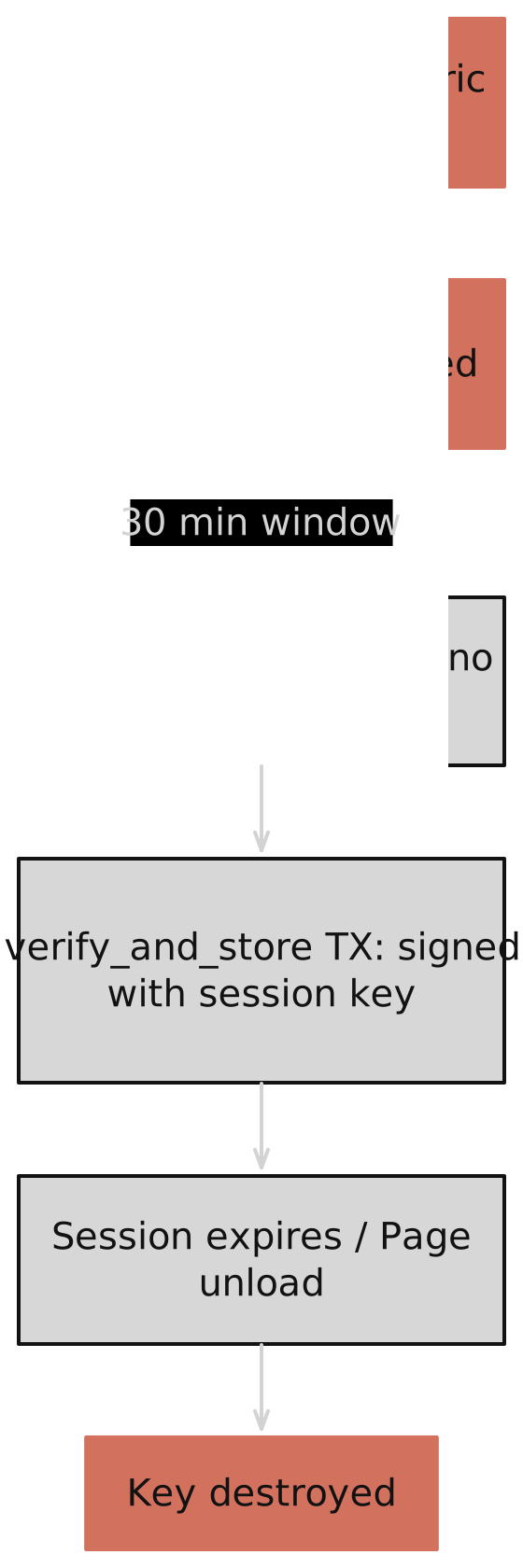
- Generation. The browser generates an ephemeral Schnorr/Grumpkin keypair. The private key exists only in JavaScript memory — it is never stored in IndexedDB or sent to any server.
- Authorisation. One WebAuthn assertion (biometric) authorises the session key on-chain. This creates a
SessionKeyNotein the account contract containing the Grumpkin public key, an expiry timestamp, and a scope field. - Parallel timing. Session key authorisation starts at the same time as ZK proof generation. By the time the proofs are complete (seconds to minutes), the session key is already authorised and ready.
- Usage. The session key signs transactions for 30 minutes (default duration). The auth witness includes discriminator 1 (Schnorr path) and the Schnorr signature, bypassing the WebAuthn path entirely.
- Expiry. After 30 minutes, the session key is invalidated client-side. On page unload, the key is destroyed from memory. A new session requires a fresh biometric prompt.
SessionKeyNote includes a scope field, designed to restrict which contract functions the session key can call. In the current implementation, scope is stored but not enforced in-circuit — this is an MVP limitation with enforcement planned for a future release.Auth witness structure
Every Aztec transaction includes an authentication witness — proof that the transaction was authorised by the account owner. The WebAuthn account uses a 524-field witness:
| Index | Content | Size |
|---|---|---|
| [0] | Discriminator (0=WebAuthn, 1=SessionKey) | 1 field |
| [1..65) | ECDSA signature (r || s, raw format) | 64 fields |
| [65..265) | Authenticator data (zero-padded) | 200 fields |
| [265] | Authenticator data actual length | 1 field |
| [266..522) | Client data JSON (zero-padded) | 256 fields |
| [522] | Client data JSON actual length | 1 field |
| [523] | Challenge byte offset in clientDataJSON | 1 field |
For the session key path (discriminator 1), only 67 fields are used: the discriminator, the Schnorr signature (64 fields), and the public key coordinates (2 fields). The remaining fields are ignored by the circuit.
The browser constructs this witness during transaction signing: triggering a WebAuthn assertion, converting the DER-encoded ECDSA signature to raw R||S format, finding the challenge's base64url position in the clientDataJSON, and packing everything into the 524-element array.
Wallet metadata
The wallet tracks per-user state in IndexedDB under the apertrue-wallet database. Key fields:
| Field | Purpose | Updates |
|---|---|---|
| credentialId | WebAuthn credential for assertions | Set at registration, never changes |
| pubKeyX / pubKeyY | P-256 coordinates for Aztec account | Set at registration |
| aztecAddress | Derived account contract address | Recomputed if bytecode changes |
| deployed | Whether account is on-chain | Set after deploy, checked on init |
| nextBatchNonce | Counter for diversified addresses | Incremented per batch upload |
| secretsProtection | How secrets are stored (prf-derived/prf/password/plaintext) | Set at registration |
| wrappedSecrets | Encrypted aztecSecretKey + aztecSalt | Updated when secrets change |
The nextBatchNonce is used for on-chain unlinkability. Each batch upload derives a fresh owner address: hash(masterSecret, nonce). The nonce is incremented after each batch and the derived key is registered with PXE so it can decrypt notes from all previous batches.
Backup and recovery
Users can export their wallet as an encrypted backup file. The backup includes wallet metadata, the encrypted media gallery, and per-file encryption keys — everything needed to restore on a new device.
- Export. The user enters a backup password. All wallet data is encrypted with PBKDF2+AES-256-GCM (310,000 iterations, OWASP 2023 recommendation) and saved as an
.encfile. - Import. On a new device, the user loads the backup file and enters the password. The wallet metadata, gallery, and encryption keys are restored to IndexedDB.
- Passkey requirement. The backup restores data, but transaction signing still requires the original passkey. If the passkey is synced via iCloud Keychain or Google Password Manager, it's automatically available. If it's device-bound and the device is lost, the user cannot sign new transactions.
prf-derived secrets, no backup is needed for key material — the Aztec secret key is re-derived from the passkey PRF on any synced device. Backups are still useful for the media gallery and encryption keys, which are not derivable from the passkey.Pseudonymous identity
Every account is assigned a pseudonymous display name, like "quiet-lens-42", that stays consistent across devices but reveals nothing about the person behind it. No usernames, no emails, no real names required. This is the identity shown on your gallery and verification pages.
The next section covers identity layers — how anonymous credentials, JWT identity proofs, and passport verification give users verifiable identity without revealing personal information.