
Media Processing & Storage
Deep metadata stripping, perceptual hashing, encryption, and storage.
After ZK proofs are generated and identity is established, the image must be prepared for storage. This section covers the media processing pipeline: metadata stripping, perceptual hashing, client-side encryption, upload, and the encrypted gallery that lets users manage their verified media.
Metadata stripping
Metadata stripping happens in two stages. The first stage runs during proof generation in the split worker. The second stage runs before upload, removing everything the first stage left behind.
Stage 1 — split worker strip
The split worker removes the C2PA/JUMBF manifest (JPEG APP11 marker) from the image after extracting the data needed for proof generation. The rest of the metadata (EXIF, ICC, IPTC) is left intact at this stage because the worker only needs to remove the cryptographic proof data.
Stage 2 — deep strip
Before upload, the deep stripper removes all remaining metadata at the binary level. It parses the file format and strips every non-essential segment:
| Format | Removed | Preserved |
|---|---|---|
| JPEG | APP0-APP15 (EXIF, XMP, ICC, C2PA, IPTC), COM (comments) | SOI, EOI, DQT, DHT, SOF, SOS → compressed pixel data |
| PNG | tEXt, iTXt, zTXt, eXIf, iCCP, tIME, caBX, caLi | IHDR, PLTE, IDAT, IEND, tRNS, gAMA, sRGB, pHYs |
The stripper produces a report listing every removed segment with its type, description, and byte size. After stripping, the file contains only the data needed to render the image — pixel data and structural markers. No GPS coordinates, device serial numbers, camera model, timestamps, author names, or edit history survive.
gAMA, sRGB, and pHYs chunks because these affect how the image renders (gamma correction, color space, and DPI). Removing them would subtly alter the image appearance. JPEG ICC profiles (APP2) are stripped because JPEG rendering is less sensitive to color profile loss.Content hashes
The system maintains two distinct hashes for every image, serving different purposes:
| Hash | Input | Format | Used for |
|---|---|---|---|
| contentHash | Original file (with all metadata) | SHA-256 (64 hex chars) | Verification page lookup, user reference |
| circuitContentHash | Stripped file (metadata removed) | SHA-256 reduced to BN254 field | ZK circuit public input, selective disclosure proofs |
The distinction matters because the C2PA manifest's content hash covers the original file, while the ZK circuit operates on the stripped file. These produce different SHA-256 values. The circuit-compatible hash is computed by the split worker: SHA-256 of the stripped bytes, reduced modulo the BN254 field order. Both hashes are stored in the encrypted media index.
Perceptual hashing
After stripping, the image is perceptually hashed using pdq-wasm, a WebAssembly binding for Meta's PDQ (Perceptual Distance Quality) algorithm. PDQ produces a 256-bit hash that is resilient to minor image modifications — crops, resizes, compression changes, and color adjustments produce similar hashes.
- Computation. The PDQ WASM module processes the image Blob directly, producing a 64-character hex string. For RAW camera files, the embedded JPEG preview is extracted first.
- Purpose. PDQ hashes enable near-duplicate detection. The backend stores hashes and can match against known exploitative content databases. PDQ is non-reversible — the image cannot be reconstructed from its hash.
- Non-blocking. PDQ computation failures do not block the upload. The hash is optional metadata that enhances content moderation capabilities.
For video, two additional fingerprinting methods are used: vPDQ (per-keyframe PDQ hashes, up to 32 keyframes) and TMK (Temporal Media Fingerprint, ~263 KB), which captures temporal patterns for cross-codec video matching. These are covered in the Video Verification section.
Client-side encryption
Every file is encrypted with AES-256-GCM before leaving the browser. The Apertrue backend stores only ciphertext.
Key lifecycle
- Generation. A fresh AES-256-GCM key is generated per upload session via
crypto.subtle.generateKey. The session ID is a UUID prefixed with "upload-". - Per-file IV. Each file gets a fresh random 96-bit IV. IV reuse with the same AES-GCM key would break confidentiality, so a new IV is generated for every file in the batch.
- Encryption. The plaintext bytes are encrypted with a 128-bit authentication tag. The output is the 12-byte IV prepended to the ciphertext — a self-contained encrypted blob.
- Key storage. The session key is exported as a JWK and stored in IndexedDB. If a wrapping key is available (from passkey PRF), the JWK is wrapped with AES-GCM before storage — encryption at rest for the photo keys themselves.
- GDPR erasure. Deleting the encryption key from IndexedDB makes the ciphertext permanently unrecoverable. This is cryptographic erasure — no need to locate and delete every copy of the ciphertext.
Upload flow
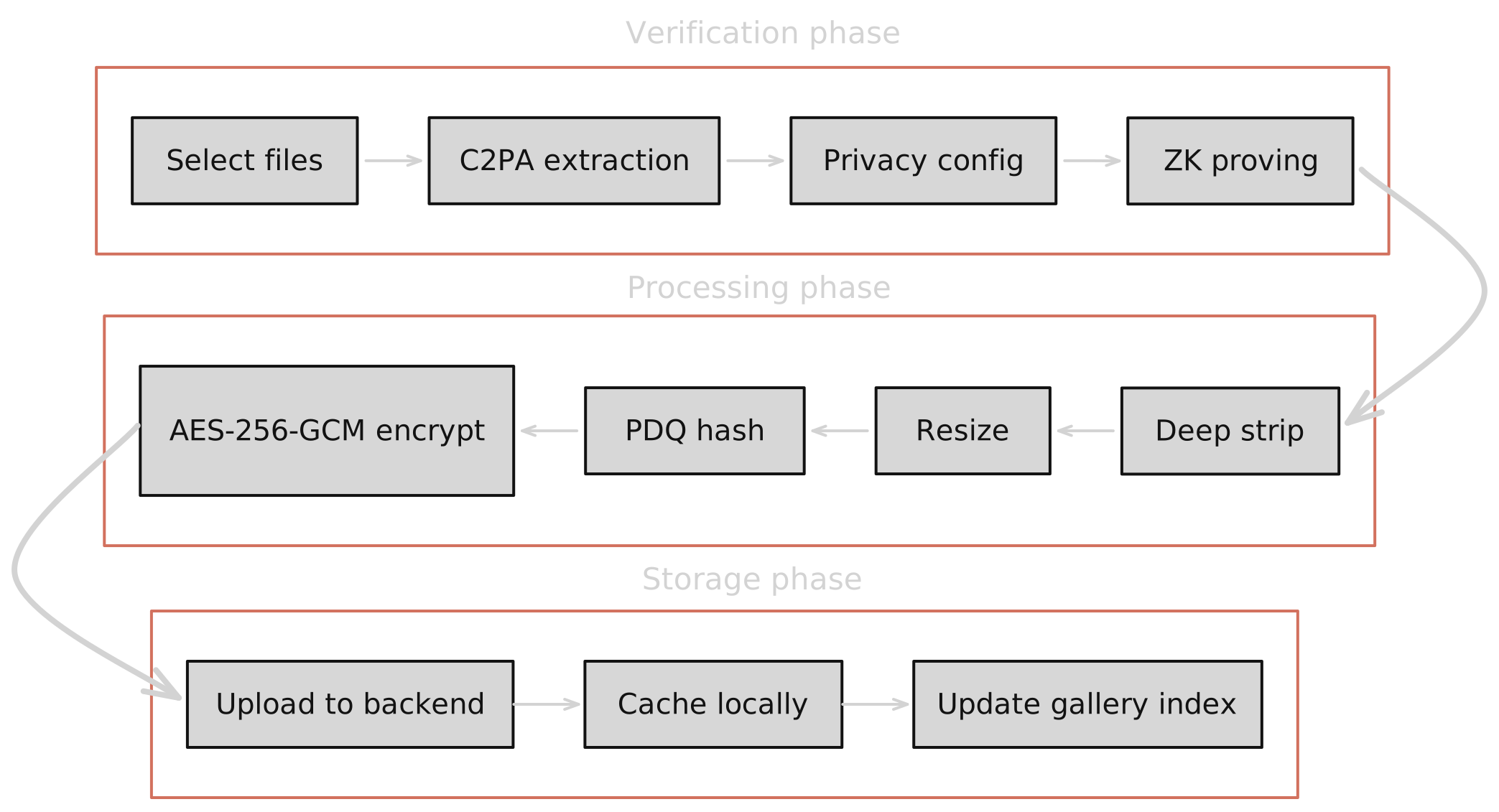
The upload pipeline processes each file through these stages:
- File selection and C2PA extraction. The user selects files. Each file is checked for a C2PA manifest. If present, the manifest is parsed and the trust tier is determined. A temporary entry is created in the media index.
- Privacy configuration. The user selects disclosure levels for each metadata category (location, time, device, etc.). These choices become circuit inputs for range proofs.
- ZK proof generation. C2PA-verified files enter the split worker pool. Workers generate ProofA and ProofB, then aggregation produces the root commitment. The worker also strips C2PA data and computes the circuit content hash.
- Deep metadata strip. The stripped image from the worker undergoes a second pass removing all remaining metadata (EXIF, ICC, IPTC, comments).
- Resize. The image is resized to a maximum dimension of 1920 pixels and encoded as JPEG at 85% quality. This produces the display version that will be stored.
- Perceptual hash. PDQ hash is computed from the image for content moderation matching.
- Encryption. The resized, stripped image is encrypted with AES-256-GCM using a per-session key. The output is a self-contained encrypted blob (IV + ciphertext).
- Upload. The encrypted blob is sent to the backend as a multipart form upload, along with verification status, disclosure preferences, proof identifiers, and the PDQ hash. The backend stores the blob in R2 and returns a CDN URL.
- Local caching. The encrypted blob is cached in IndexedDB by CDN URL for offline gallery playback — avoiding re-fetching from CDN on the next view.
- Gallery index update. The media index entry is updated with the backend media ID, CDN URL, encryption session ID, content hashes, ZK commitments, disclosure preferences, and all provenance metadata.
The encrypted media index
The media index is the user's private gallery — an encrypted JSON document stored in IndexedDB that tracks every verified upload. It contains everything the user needs to view, manage, and prove their media.
Gallery key derivation
The gallery encryption key is derived deterministically from the Aztec secret:
Because the derivation is deterministic, the same Aztec secret always produces the same gallery key — enabling persistent access across browser sessions and synced devices.
Index contents
Each entry in the media index stores:
- Backend references. Media ID, CDN URL, encryption session ID (for key lookup), thumbnail URL.
- Content hashes. Both
contentHash(original) andcircuitContentHash(stripped, BN254 field) for verification and selective disclosure. - ZK commitments. Root commitment, image commitment, Merkle path, link commit, location commitment, time commitment, actions hash — everything needed for future selective disclosure proofs.
- Original metadata. GPS coordinates, capture date, device model, lens, exposure settings — stored locally so the user can optionally disclose them later via commitment opening.
- Disclosure preferences. The user's privacy choices for each metadata category, including any identity disclosures (organisation domain, nationality, verified human status).
- Blockchain state. Aztec transaction hash, root commitment, contract address, aggregation ID — linking the local entry to the on-chain record.
The entire index is encrypted at rest with AES-256-GCM. Every read decrypts the full index; every write re-encrypts and stores the updated JSON. Stale entries (stuck in "proving" or "uploading" for more than 30 minutes) are automatically cleaned up.
Storage architecture
| Layer | What | Where | Encryption |
|---|---|---|---|
| Encrypted blob | Image/video ciphertext | Cloudflare R2 (CDN-delivered) | AES-256-GCM (client key) |
| Media metadata | Verification status, PDQ hash, provenance | PostgreSQL (backend) | None (public metadata) |
| Encryption keys | Per-session AES-256 JWK | IndexedDB (browser) | Optional PRF wrapping |
| Media index | Full gallery with commitments | IndexedDB (browser) | AES-256-GCM (gallery key) |
| Blob cache | Encrypted blob by CDN URL | IndexedDB (browser) | Same as R2 (still encrypted) |
The backend stores encrypted blobs and public metadata (verification status, PDQ hash, disclosure preferences). The browser stores decryption keys and the full gallery index. Compromising the backend yields only ciphertext and perceptual hashes — no plaintext images, no private metadata, no GPS coordinates.
Viewing encrypted media
When a user views a photo from their gallery:
- The browser reads the media index entry to find the CDN URL and encryption session ID.
- If the encrypted blob is in the local cache (IndexedDB), it is loaded directly. Otherwise, the blob is fetched from the CDN.
- The encryption key is retrieved from IndexedDB using the session ID.
- The first 12 bytes of the blob are extracted as the IV. The remainder is decrypted with AES-256-GCM.
- The plaintext image bytes are displayed in the browser.
Thumbnails may be stored as data URLs in the media index for instant gallery rendering without decrypting the full image. Video thumbnails are generated client-side by seeking to the 1-second mark and capturing a canvas frame.
The next section covers video verification — how C2PA manifests are extracted from video containers, how keyframes are fingerprinted, and how the verification pipeline adapts for moving images.